
PondScan Pro
✅ Works right now in your browser — no install needed
PondScan is a web app. Open it, upload a pond screenshot, and you're fishing in 30 seconds. Add it to your Home Screen for full-screen + offline use.
🎣 Open App in Browser📲 Add to your Home Screen (recommended)
Open catchmapapp.com in Safari, then tap the Share button (the square with an up arrow, in Safari's bottom bar)
Scroll down the share sheet and tap Add to Home Screen
Tap Add — done. The PondScan icon launches full-screen and works offline 🎣
On Android: open the app in Chrome → tap the ⋮ menu → Add to Home screen → Install. No profile needed on any platform.
Firefox fan? Firefox doesn't support full app installs — no worries, just use PondScan right in your browser, it works the same 🦊
⚙️ Alternate method: iOS configuration profile
Prefer the old profile shortcut? Download the PondScan profile, then:
- Tap Allow when Safari asks to download the profile
- Open Settings → Profile Downloaded (top of the main page — later under General → VPN & Device Management)
- Tap Install (top right) → enter your passcode if asked → Done
Why does iOS ask for my passcode? Installing any configuration profile requires the device to be unlocked — that's an Apple security rule for every profile, not just this one. The PondScan profile only places a shortcut icon on your Home Screen: it requests no access to your data, location, accounts, or settings, and you can remove it anytime in Settings → General → VPN & Device Management.
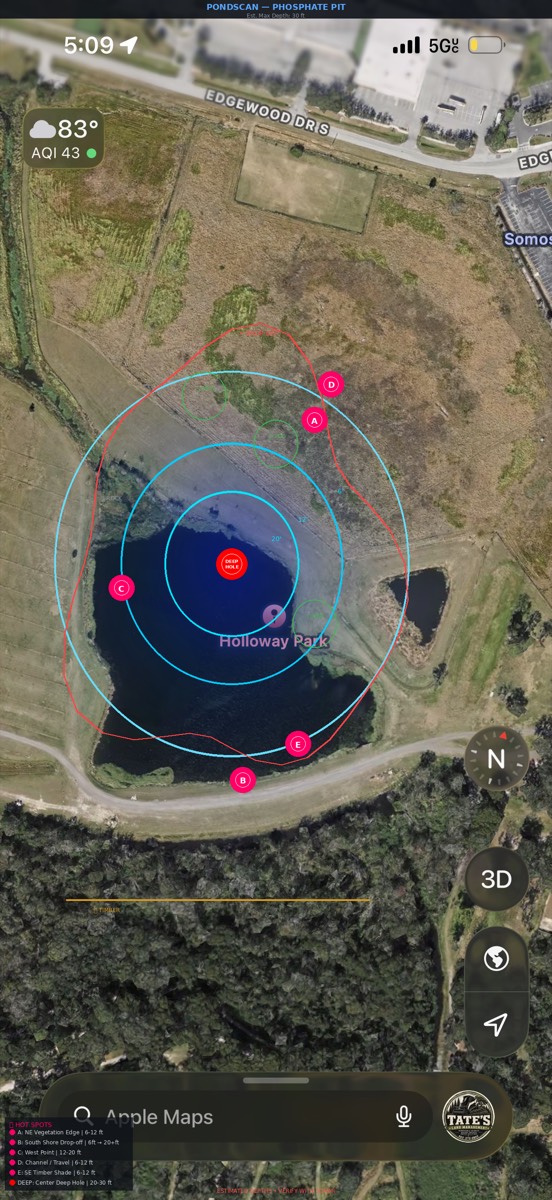
What's inside
Deep, mid, and shallow zones from one screenshot — no sonar needed.
Pinned with baits, depth ranges, and best times for your pond type.
The strike zone, drawn right on your screenshot.
What to throw, where, and when — spring through winter.
Log your own catches, import history, filter 3+ lb trophies.
Everything runs on your phone — map tiles just need one online view. Works at the pit with zero signal.
Your screenshots and catches never leave your phone.
Map tiles load from CARTO when online; everything else stays on your device.
Privacy · Terms · 💬 Feedback / report a problem